

Option A
Traditional Single Router
The familiar, straightforward centerpiece of most home networks.
Best for: Smaller homes or apartments where one central device can reach every room without signal drop-off.
Option B
Mesh Network System
A distributed team of nodes engineered to eliminate dead zones in larger spaces.
Best for: Larger or multi-story homes, thick-walled properties, and households with many connected devices spread across multiple rooms.
How Each System Actually Works
A traditional router is a single device that connects to your modem and broadcasts a Wi-Fi signal in all directions from one fixed point. Think of it as a single lamppost: bright at the center, dimmer toward the edges. The further a device sits from that lamppost — or the more walls stand in the way — the weaker the signal becomes. For a concise overview of how these components fit together, see how your home network works from the router outward.
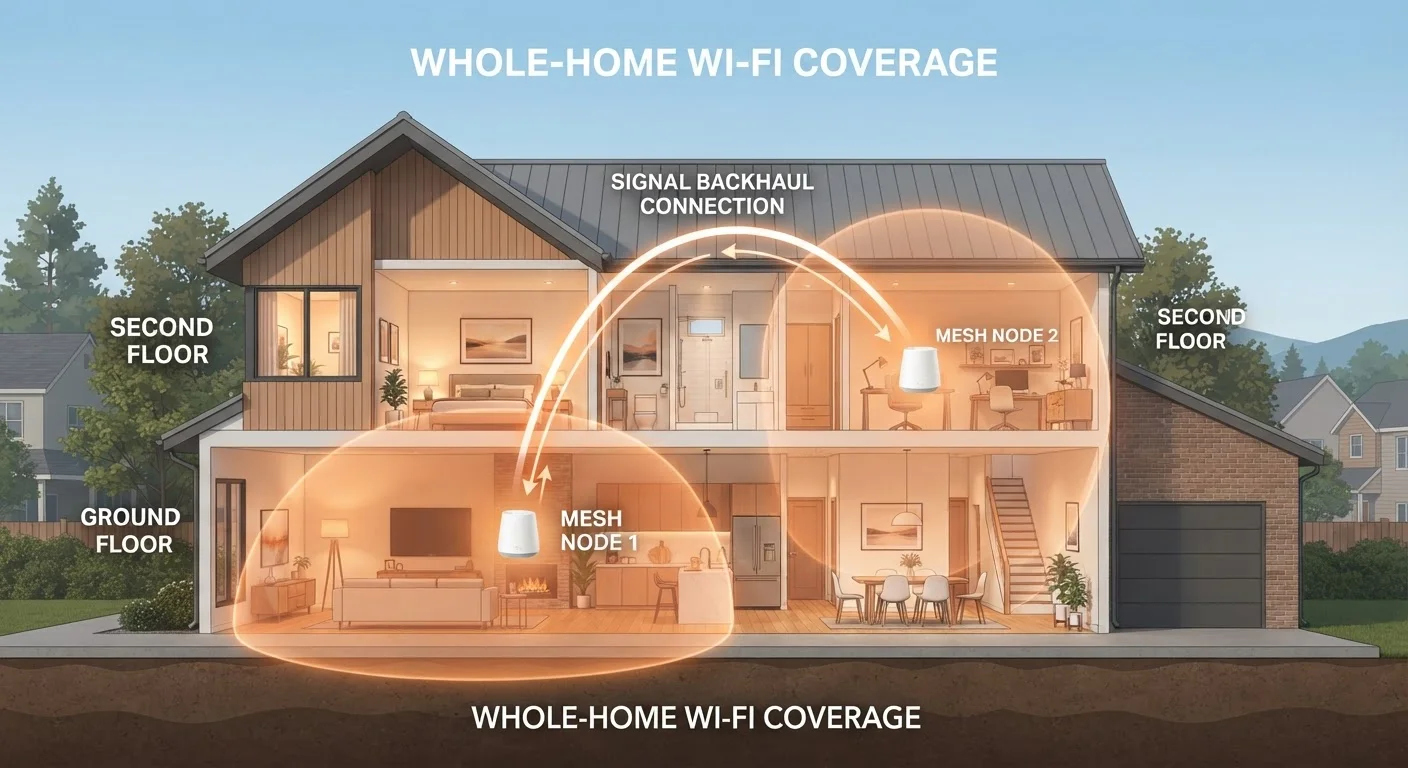
A mesh network replaces that single lamppost with a coordinated team of smaller nodes — a primary node connects to the modem, while satellite nodes are placed around the home. The nodes talk to each other continuously, passing your device's connection from one to the next as you move, without you manually switching networks. The entire system appears as one Wi-Fi network name (SSID), so your phone or laptop never has to ask which node is closest — the system decides automatically.
This handoff behavior is the defining difference. Traditional routers don't hand off connections; your device holds on to the original router's signal even when it would get a stronger connection elsewhere, which is why you sometimes notice sluggishness on the far side of the house.
| Criterion | Traditional Router | Mesh Network System |
|---|---|---|
| Coverage approach | Single broadcast point | Multiple coordinated nodes |
| Network name (SSID) | One (or separate for extender) | One unified SSID across all nodes |
| Device handoff while roaming | Manual or none | Automatic and seamless |
| Typical upfront cost | Lower | Higher (multiple nodes) |
| Scalability | Limited without extenders | Add nodes as needed |
| Setup complexity | Simple | Simple to moderate |
| Best home size | Under ~1,500 sq ft | 1,500 sq ft and above |
Range Extenders: A Middle Ground That Often Falls Short
Many consumers try to stretch a traditional router's reach by adding a range extender (also called a Wi-Fi repeater or booster). An extender picks up the router's signal and rebroadcasts it — but it typically creates a separate network with a different name, and it must receive and retransmit on the same radio channel. That process can cut effective throughput roughly in half for devices connected through the extender.
Mesh systems sidestep this problem by using dedicated backhaul — a reserved communication channel between nodes, often on a separate radio band — so the nodes coordinate without competing with your devices' traffic. Some mesh systems even support a wired backhaul via Ethernet cable between nodes, which essentially eliminates the wireless overhead altogether. For a deeper look at when wired connections outperform wireless ones, see the comparison of wired vs. wireless for each use case.
Tri-Band Mesh and Dedicated Backhaul
Higher-end mesh systems use a third radio band exclusively for node-to-node communication. This dedicated backhaul means the channel your devices use for browsing is never shared with the channel nodes use to coordinate with each other. The practical result is more consistent throughput across the system, particularly in homes with many simultaneously connected devices. If backhaul performance matters to you, look for systems that explicitly advertise a dedicated backhaul band or support wired Ethernet backhaul.
Cost, Complexity, and What to Consider Before Deciding
Traditional routers carry a lower upfront cost and require minimal configuration for most households. A single capable router placed centrally — ideally elevated and away from walls — can reliably cover a well-designed home under roughly 1,500 square feet. If you're uncertain whether your current setup has fixable weak spots before committing to a new system, a home network audit checklist can help you identify the real source of the problem.
Mesh systems involve higher upfront investment — a typical two- or three-node kit costs more than most single routers — but they simplify expansion. Adding a node is usually as straightforward as plugging it in; the system self-configures. Management apps tend to be consumer-friendly, with features like device prioritization, parental controls, and automatic firmware updates built in.
One important caveat for both options: neither a mesh system nor a traditional router can deliver speeds faster than what your internet service provider (ISP) supplies. If the underlying plan is the bottleneck, upgrading your in-home network equipment won't resolve it. Similarly, a poorly placed mesh node — stuck behind a refrigerator or in a basement utility closet — will underperform just as badly as a poorly placed router.
~30%
Signal strength lost per wall (average)
General RF engineering estimates suggest a standard interior wall can reduce Wi-Fi signal strength by roughly 30%, with denser materials like brick or concrete causing significantly greater attenuation.
25+
Connected devices in an average U.S. home
According to Deloitte's Digital Media Trends research, the average U.S. household has consistently grown its connected device count, increasing the load distributed across home networks.
The content on this site is for informational purposes only and is not a substitute for professional advice. Always consult a qualified professional for guidance specific to your situation.