

Our Verdict
Fibre delivers the clearest performance advantage — symmetrical speeds, low latency, and no shared-line congestion. Cable is a strong middle ground where fibre hasn't reached, while DSL remains the fallback for areas with older telephone infrastructure. The technology underneath your home largely determines what's possible, regardless of the plan tier you purchase.
| Best for | Recommended |
|---|---|
| Households needing fast, reliable upload and download speeds | Fibre (FTTP/FTTH) |
| Areas without fibre but with active cable TV infrastructure | Cable (DOCSIS) |
| Rural or older suburban areas where only telephone lines are available | DSL (ADSL/VDSL) |
The Physical Layer: Why the Medium Matters
When you pay for broadband, you're ultimately paying for a specific physical pathway between your home and the internet. That pathway — whether it's a hair-thin glass strand, a metal coaxial cable, or a century-old copper telephone wire — determines the absolute ceiling on speed, latency, and reliability. No plan upgrade can overcome the physics of the medium itself.
Three technologies dominate residential broadband in the US: fibre optic, cable, and DSL. Each uses a fundamentally different approach to move data, and each comes with distinct strengths and limitations. Understanding how they work helps demystify why two neighbors on the same street can have wildly different internet experiences. For a deeper look at what happens after the signal enters your home, see how your home network works from the router outward.
Fibre Optic: Light as Data
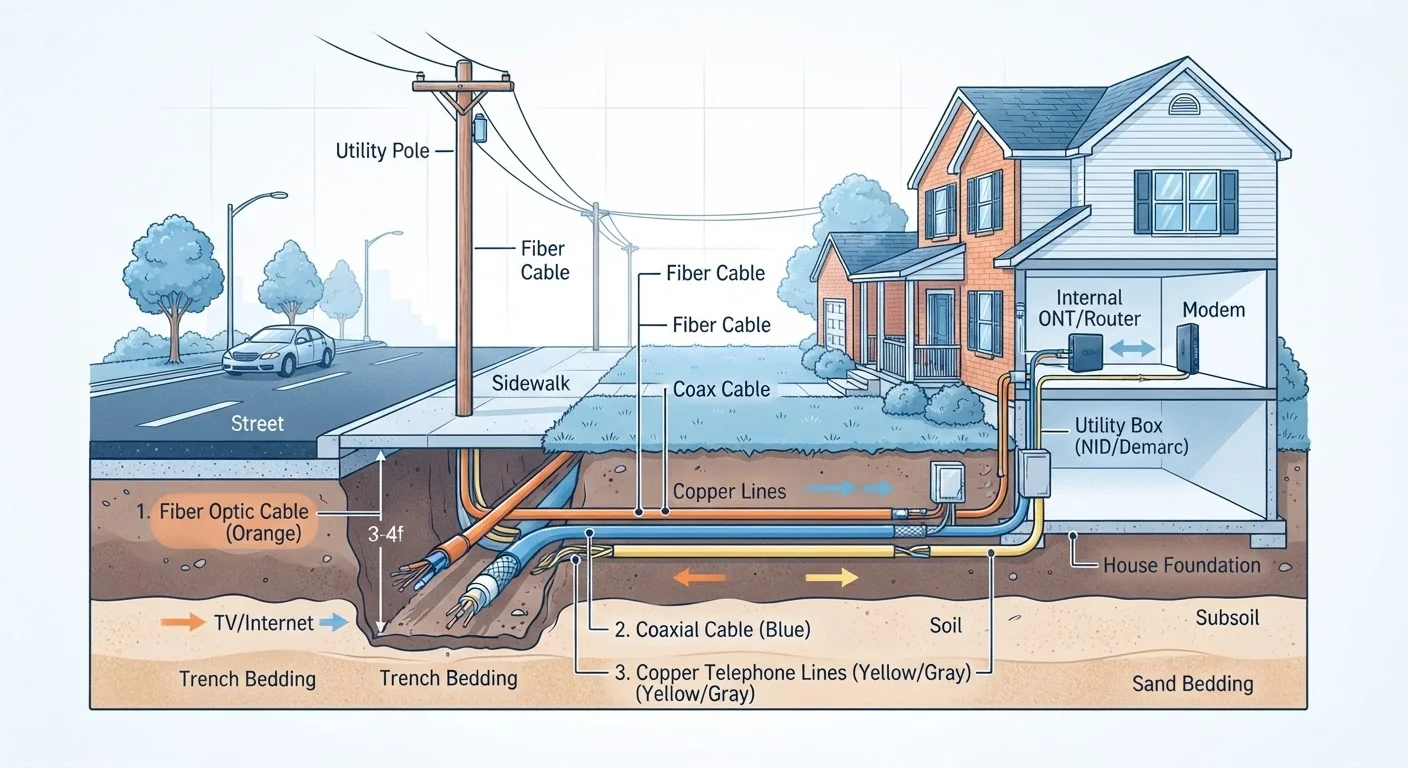
Fibre optic broadband encodes data as pulses of light and transmits them through strands of glass roughly the width of a human hair. Because light travels with minimal signal degradation and is immune to electrical interference, fibre can carry far more data over far greater distances than copper-based alternatives.
The key distinction consumers encounter is how far the fibre actually runs. FTTP (Fibre to the Premises) — also called FTTH (Fibre to the Home) — means the glass strand runs directly into your building. This delivers the full benefit: symmetrical upload and download speeds (equally fast in both directions), very low latency, and no performance loss caused by the last stretch of cabling. FTTC (Fibre to the Cabinet) is a hybrid: fibre reaches a street-level junction box, then copper telephone wire carries the signal the remaining distance to your door. That copper tail reintroduces the limitations associated with DSL.
Pure FTTP connections are the only broadband type where the technology itself doesn't impose a practical ceiling on residential use in the near term. If you're evaluating what those speed numbers actually mean day-to-day, download speed, upload speed, and latency explained is a useful companion read.
Cable: The Coaxial Workhorse
Cable internet uses the same coaxial cable infrastructure originally built to deliver cable television. Coaxial cable carries data much faster than twisted-pair copper phone wire because of its shielded construction and wider frequency range. The DOCSIS standard (Data Over Cable Service Interface Specification) governs how data travels over this infrastructure, and newer versions (DOCSIS 3.1 and 3.0 before it) have pushed cable speeds into the multi-gigabit range in capable markets.
Cable's practical limitation is that the network is shared at the neighborhood level. Multiple households draw from the same segment of cable, which means peak-time congestion — when everyone is streaming in the evening — can reduce real-world speeds noticeably. Upgrades to the DOCSIS standard and network segmentation by providers have reduced this problem, but it hasn't been eliminated.
Upload speeds on cable connections have historically lagged well behind download speeds, though DOCSIS 3.1 with its full-duplex capability is beginning to change that for subscribers on upgraded infrastructure.
| Fibre (FTTP) | Cable (DOCSIS) | DSL (ADSL/VDSL) | |
|---|---|---|---|
| Transmission medium | Glass fibre optic strands | Coaxial cable | Copper telephone wire |
| Typical download speeds | 100 Mbps – 1+ Gbps | 25 Mbps – 1 Gbps | 5 – 100 Mbps |
| Upload speed parity | Symmetrical (equal up/down) | Often asymmetric (lower upload) | Asymmetric (much lower upload) |
| Latency | Very low | Low to moderate | Moderate |
| Distance sensitivity | Negligible over long runs | Low | High — speed drops with distance |
| Shared infrastructure | No (dedicated line) | Yes (neighborhood nodes) | No (dedicated pair) |
| Geographic availability | Growing but not universal | Broad in urban/suburban areas | Widest coverage including rural |
DSL: Copper's Digital Lifespan
DSL (Digital Subscriber Line) transmits data over the copper telephone lines that already connect most homes to a telephone exchange. Because the infrastructure is already in place, DSL remains one of the most geographically widespread broadband options available — especially in rural and older suburban areas.
The critical constraint is distance attenuation: the signal weakens as it travels down copper wire. A home half a mile from the telephone exchange will receive noticeably lower speeds than one directly adjacent to it. ADSL (Asymmetric DSL) is the most common legacy variant, offering faster downloads than uploads over longer runs. VDSL (Very High Speed DSL) improves on this but requires the exchange or a street cabinet to be close — typically within about a mile.
DSL is not a technology built for modern bandwidth demands like 4K streaming to multiple devices or frequent large uploads. However, for light internet use in areas where alternatives don't exist, it remains functional. Understanding what your router and modem are actually doing with that incoming signal is worth exploring — the difference between a modem and a router breaks it down clearly.
It's also worth noting that many households pay for plan tiers their connection type physically cannot deliver. common misconceptions about internet speed addresses exactly that pattern.
What This Means When Choosing a Service
Your choice of broadband technology is often constrained by what infrastructure exists at your address — you can't choose fibre if it hasn't been laid to your street. But understanding the underlying technology still matters for several reasons:
- Diagnosing slowdowns: If you're on DSL and speeds drop at night, that's likely distance attenuation compounded by contention — not a fixable router setting.
- Evaluating upgrade claims: A provider advertising "up to 100 Mbps" over ADSL may only deliver a fraction of that at your specific distance from the exchange.
- Planning for symmetric needs: Video calls, cloud backups, and remote work all require solid upload speeds — a strong argument for FTTP over cable or DSL where available.
For households in areas without wired broadband infrastructure at all, satellite internet represents a separate category of technology with its own trade-offs. how satellite internet works and where it fits explores that option in depth.
The content on this site is for informational purposes only and is not a substitute for professional advice. Always consult a qualified professional for guidance specific to your situation.