

Why Smart Devices Don't Automatically Understand Each Other
Plug a smart bulb into your ceiling, and it doesn't automatically know your thermostat exists — even if both sit on the same shelf at the store. That's because smart home devices communicate using a handful of distinct wireless protocols, and those protocols don't inherently speak to one another. Think of it like countries with different languages: proximity doesn't guarantee comprehension.
The most common protocols you'll encounter are Wi-Fi, Bluetooth, Zigbee, Z-Wave, and the newer Thread and Matter. Each was designed with different priorities — battery life, range, data speed, or open standardization — and each makes different trade-offs. See how Bluetooth, Wi-Fi, and NFC compare for a broader look at short-range radios.
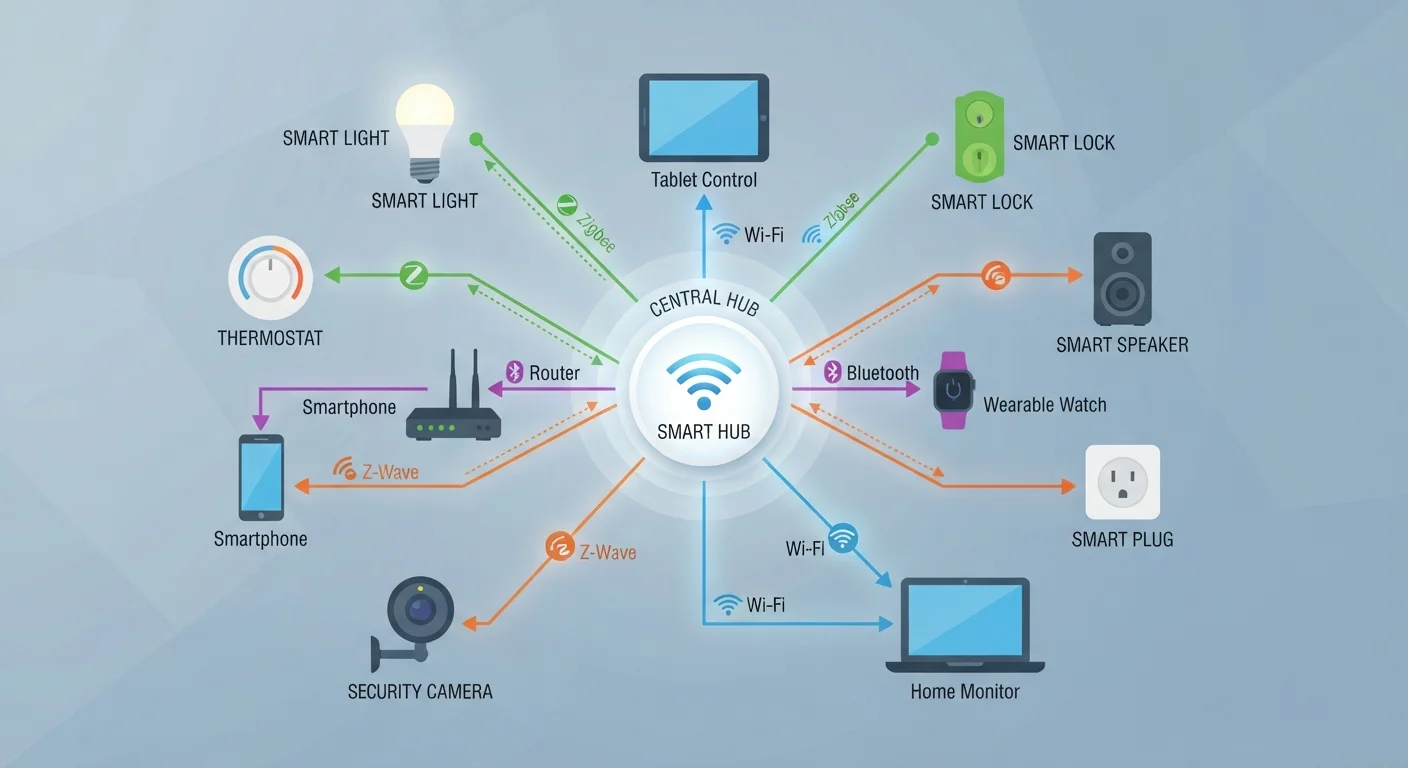
Wi-Fi is fast and already in most homes, but it draws significant power and can crowd a router when dozens of devices connect simultaneously. Zigbee and Z-Wave are low-power alternatives that sacrifice raw speed for efficiency — ideal for sensors, door locks, and smart plugs that need to run on batteries for months.
What Hubs and Bridges Actually Do
A hub sits at the center of your smart home and acts as the translator and traffic controller for devices that speak different protocols. When you tap a button in an app to dim your lights, the command travels from your phone to the hub, and the hub converts it into the correct language for your specific bulbs.
A bridge performs a narrower version of the same job: it connects one device ecosystem to your home network without necessarily coordinating multiple protocols. A proprietary smart lighting bridge, for example, connects that brand's bulbs to your Wi-Fi so you can control them — but it doesn't help your Zigbee door sensor communicate with your Z-Wave thermostat.
Multi-protocol hubs solve the fragmentation problem by supporting several radio standards at once. A single capable hub can receive a signal from a Zigbee motion sensor, process an automation rule, and send a command to a Z-Wave light switch — all within milliseconds.
Mesh Networking: Why Zigbee and Z-Wave Can Reach Further
One underappreciated advantage of Zigbee and Z-Wave over Wi-Fi is mesh networking. In a mesh setup, devices don't just communicate with the hub directly — they relay signals through each other. A Zigbee bulb in your hallway can pass a message from a sensor in your basement to the hub in your living room, extending coverage organically as you add more devices.
~10–20m
Typical direct Zigbee device range indoors
Range varies by environment, but mesh relay allows the effective network reach to extend well beyond a single hop.
2.4 GHz
Radio frequency used by Zigbee
Zigbee shares the 2.4 GHz band with Wi-Fi and Bluetooth, which can cause interference in congested radio environments.
908.42 MHz
Z-Wave primary frequency (North America)
Z-Wave operates on a sub-GHz frequency that avoids the crowded 2.4 GHz band, reducing interference from Wi-Fi and Bluetooth devices.
Wi-Fi devices, by contrast, typically connect directly to your router in a star topology. If a device is too far from the router, or walls block the signal, performance degrades. This is one reason smart home practitioners often recommend Zigbee or Z-Wave for larger homes with many sensors. For a deeper look at how your home network is structured, see your home network explained from the router outward.
Matter and Thread: The Push Toward a Common Language
Matter is an open connectivity standard backed by major industry players — its goal is to let devices from different manufacturers work together without requiring consumers to worry about protocol compatibility. Matter operates at the application layer, meaning it defines how devices describe their capabilities and accept commands, rather than specifying the radio hardware underneath.
Thread is often the radio protocol that Matter uses to carry those messages. Thread is an IPv6-based mesh protocol designed specifically for low-power smart home devices. A Thread network needs at least one Thread Border Router — a device that bridges the Thread mesh to your main IP network — which is increasingly built into smart speakers and hubs.
Matter doesn't eliminate hubs overnight. Existing Zigbee and Z-Wave devices require a Matter-capable hub to bridge them into a Matter ecosystem. But for new device purchases, Matter certification is a signal worth looking for — it means the device is designed to work across ecosystems without proprietary lock-in. Pair this knowledge with securing your home Wi-Fi network for a safer, more stable foundation.
Practical Guidance for Consumers
Before buying any smart home device, a few questions are worth answering:
- What protocol does it use? Check the packaging or spec sheet. If it uses Zigbee or Z-Wave, you'll need a compatible hub. The consumer tech glossary can help decode unfamiliar spec-sheet language.
- Does it support Matter? A Matter badge means it's designed for broad cross-ecosystem compatibility, which is increasingly useful as the standard matures.
- Is your existing hub compatible? If you already own a hub, verify it supports the new device's protocol before purchasing. Manufacturer compatibility lists are the most reliable source.
- How many devices will connect? Wi-Fi routers handle a finite number of stable connections. For large smart home setups, offloading many devices onto a Zigbee or Z-Wave mesh reduces router congestion. For related considerations on wired versus wireless trade-offs, see wired vs. wireless for each room and use case.
The smart home ecosystem is still evolving, and perfect interoperability between all devices from all brands doesn't yet exist. But understanding the role protocols, hubs, and bridges play puts you in a much stronger position to build a setup that actually works together — now and as you expand it over time.
Frequently Asked Questions
Not always. Many modern smart devices connect directly to your Wi-Fi router without a hub. However, devices using Zigbee or Z-Wave do require a hub or bridge to function, because those protocols cannot communicate directly with a standard Wi-Fi router.
A hub typically manages and coordinates multiple devices, often providing automation logic and a central interface. A bridge is more narrowly focused on translating between two specific protocols or connecting a single device ecosystem to your broader network — for example, connecting a set of smart lights to your Wi-Fi.
Matter is designed to provide a common application layer that works across ecosystems, but it doesn't necessarily replace Zigbee or Z-Wave at the radio level. Many Matter-compatible devices use Thread as the underlying radio protocol, while existing Zigbee and Z-Wave devices can sometimes be bridged into a Matter network via a compatible hub.
Not directly — they use different radio frequencies and protocols. A multi-protocol hub that supports both Zigbee and Z-Wave is required to bring devices from each ecosystem under one roof. Several popular hubs support both simultaneously.
Matter significantly improves cross-brand compatibility at the software layer, but practical limitations remain. Not all devices support Matter yet, and some features specific to a manufacturer's app may not be exposed through the Matter standard.
Zigbee consumes far less power than Wi-Fi, making it suitable for battery-powered sensors and devices that need to run for months without recharging. Zigbee also supports mesh networking, which can extend signal range in ways a direct Wi-Fi connection cannot.
The content on this site is for informational purposes only and is not a substitute for professional advice. Always consult a qualified professional for guidance specific to your situation.